Elevator Software for Maintenance Management Made Simple
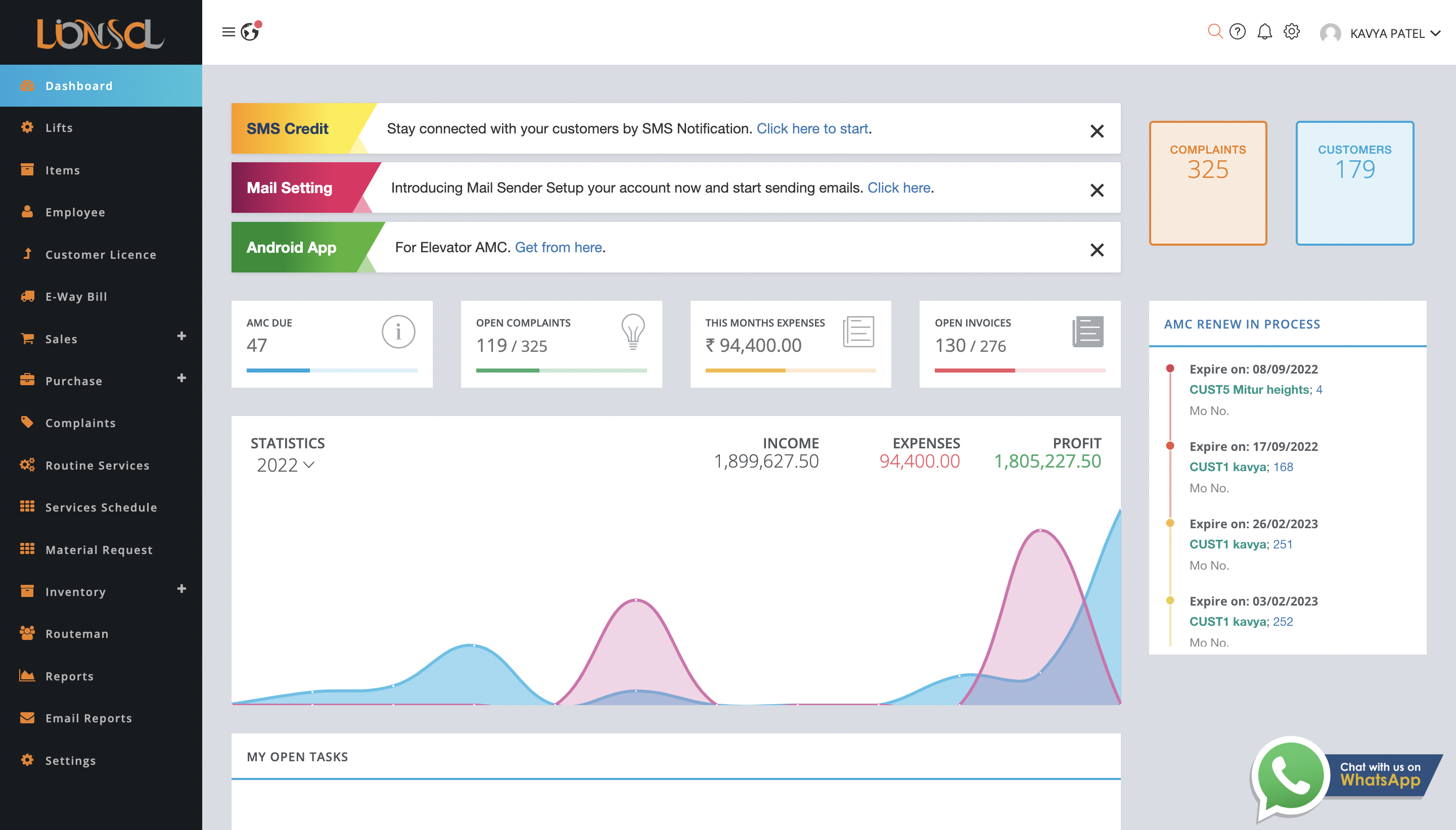
Streamline your elevator Software for maintenance contracts, routine services, and breakdown management with our comprehensive AMC solution.
Help Center
100% Secure Data
Toll Free 011 6931 3323
Streamline your elevator Software for maintenance contracts, routine services, and breakdown management with our comprehensive AMC solution.
Everything you need to manage your elevator maintenance business efficiently

Manage all your AMC contracts in one place with automated renewals, reminders, and comprehensive tracking.

Schedule and track preventive maintenance services with automated notifications and digital documentation.

Create, assign, and track breakdown tickets with real-time updates and technician allocation.

Enable customers to create tickets instantly by scanning QR codes placed in elevator locations.

Generate professional invoices, track payments, and send automated reminders for overdue payments.

Keep customers informed with automated WhatsApp updates about services, tickets, and renewals.
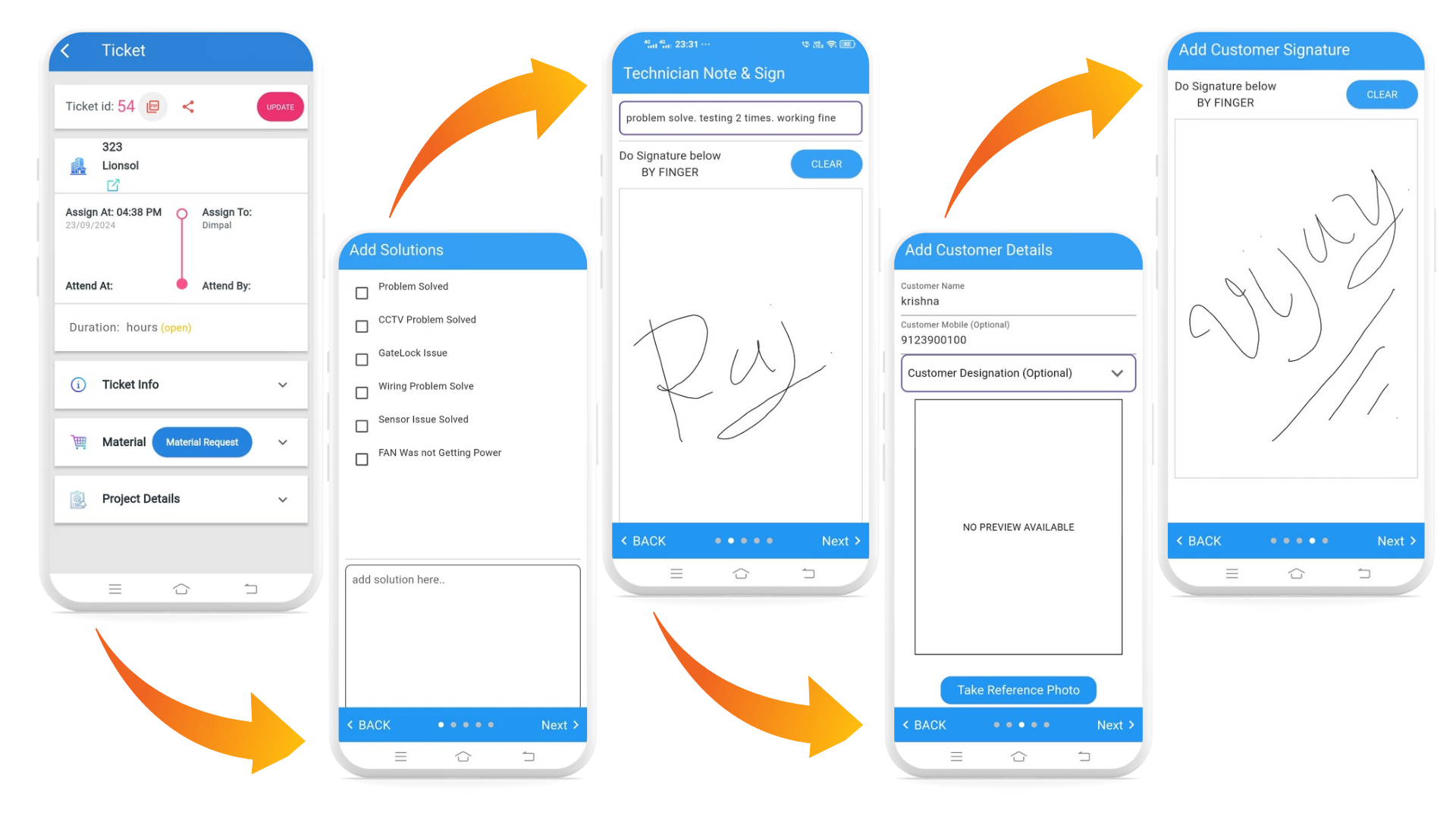
Empower your field technicians with our mobile app for real-time updates, digital signatures, and location tracking.
Choose the plan that fits your business needs (18% GST extra)
Upgrade your plan anytime using Cash Ledger Balance
Join hundreds of businesses managing their elevator maintenance with our solution

West Bengal

Gujarat

Tamil Nadu

Bangalore

Gujarat

Delhi

Tamil Nadu

Tamil Nadu

Tamil Nadu

Tamil Nadu

Tamil Nadu

Lucknow

Rajasthan
Pune

Delhi

Delhi

Maharashtra

Goa

Maharashtra
Maharashtra

Gujarat

Gujarat
Everything you need to know about Lionsol AMC management, Lionsol ONE APP, and system features.
The "Enter No. of Service" field defines the total count of routine maintenance visits agreed upon for the duration of the Annual Maintenance Contract (AMC). For example, entering "12" on a one-year contract sets up monthly scheduled checkups for that equipment or site.
Once you define the contract start date, end date, and total number of services, Lionsol's engine automatically calculates and spaces out the service dates evenly across the entire contract lifecycle, eliminating manual calendar calculations.
Yes. While the system automates initial scheduling, administrators and authorized team leaders can reschedule, reassign, or fine-tune individual service dates at any point to accommodate customer availability or technician workloads.
Upon renewal, the system creates a new service schedule distributed across the newly renewed contract period. All completed records, service logs, and historical reports from previous contract terms remain permanently preserved in the customer's history for audit tracking.
No. Once a service visit is signed off and marked as Completed, it is permanently locked and cannot be deleted by any user, including system administrators.
This strict rule protects data integrity, statutory compliance, and transparent customer dispute resolution. Because completed services contain legal digital signatures, geo-coordinates, and timestamps, preventing deletion ensures an immutable, audit-ready operational history.
Because completed visits cannot be modified or purged, administrators should generate an additional ad-hoc routine service on or near the target date to ensure the customer receives their planned physical inspection.
Lionsol ONE APP gives field technicians real-time access to assigned breakdown tickets and scheduled routine maintenance. Technicians can log checklist items, attach site photos, record work remarks, and collect digital signatures on-site. Upon completion, a branded service report PDF is generated and sent to the client instantly.
When updating a breakdown ticket or completing a routine service, the app automatically captures precise GPS coordinates (latitude and longitude) at the exact moment customer and technician signatures are submitted. This verifies physical presence on-site without requiring continuous background battery drain.
Yes. Each unit or lift can be tagged with a unique QR code. Customers simply scan the QR code using any smartphone camera to open a web portal where they enter their name, mobile number, and select the issue template. The ticket is immediately registered in the ERP and assigned to the relevant route or technician.
Yes. Using the built-in Lionsol Document Editor, you can tailor your header/footer layouts, logos, terms and conditions, quotation formats, and signature blocks to match your company's corporate branding.
Yes. Lionsol provides granular Role-Based Access Control (RBAC). You can define distinct permission profiles (e.g., Admins, Accounts, Team Leaders, and Field Technicians) to control who can view, create, edit, approve, or export financial details, customer contracts, and route logs.
Lionsol cloud infrastructure employs modern security best practices, including encrypted database storage, HTTPS/TLS transmission, multi-factor authentication options, automated backups, and isolated role-based access rules to safeguard sensitive enterprise records from unauthorized access.
Yes. The system automatically sends renewal reminders via email and SMS to both the administrator and customer contacts 30 days prior to contract expiry, ensuring timely follow-ups and zero lapses in coverage.
Your subscription includes starter SMS credits. Once exhausted, account administrators can purchase additional credit bundles directly inside the portal by navigating to Settings → SMS Purchase with instant account balance top-ups.
To set up and assign branches, navigate to the "Create Customer" form. Next to the Branch dropdown menu, click the quick-add "+" button to register a new branch location on the fly. When creating or editing a customer record, simply map them to their designated branch from this dropdown list. Once assigned, branch-restricted users and staff will only see, manage, and service customer accounts mapped specifically to their assigned branch, ensuring strict multi-location data isolation and operational clarity across your organization.
Lionsol enforces role-based branch segmentation. When an employee profile is configured, you can assign them to a dedicated branch or grant multi-branch/head-office privileges. Users assigned to a specific branch are automatically accessed to viewing only the contracts, routine services, breakdown tickets, and customer ledgers belonging to that branch. Company administrators maintain full visibility across all regional branches from a unified central dashboard.
Yes. Authorized administrators can open the customer profile or contract master, select "Edit(Blue Pencil Icon)," and update the branch mapping from the dropdown selector. Upon saving, all associated units, scheduled routine services, and active breakdown tickets automatically transition under the new branch's management pipeline without losing historical completion logs or signed PDF reports.
Yes. Authorized administrators can open the customer profile or contract master, select "Edit (Blue Pencil Icon)," and update the route assignment from the dropdown selector. Upon saving, all associated units, scheduled routine services, and active breakdown tickets automatically transition under the new route's service pipeline without losing historical completion logs or signed PDF reports.
Lionsol uses a two-tier security framework to control user access: Module/Feature Permissions and Data Permissions. Module/Feature Permissions define the operational actions a user can perform—such as viewing, creating, editing, or deleting records within specific sections like Contracts, Tickets, Invoices, or Master Settings. Data Permissions define the geographic or operational boundary of what records that user is allowed to see and perform those actions on (e.g., viewing records company-wide versus only for an assigned branch or service route).
Lionsol provides three distinct Data Permission levels to fit your organizational hierarchy:
1) All Data Access: Grants full visibility across all company branches, customers, routes, Services and Tickets/Breakdowns
2) Branch-Wise Data Access: Restricts visibility strictly to customers, contracts, tickets, and assets belonging to the user's assigned branch office.
3) Route-Wise Data Access: Limits visibility exclusively ,Customer site Visits, and customers mapped to a specific service route And BreakDown Tickets assigned to that user (Ideal for Field Technicians).
Route-Wise Data Access enforces strict operational boundaries so service teams only see their designated customer sites. For example, suppose User 1 (Team Leader or Field Technician) is assigned to Route A (e.g., West Zone), and User 2 is assigned to Route B (e.g., East Zone). Under Route-Wise permission rules, User 1 can only access, view, and update customers, scheduled routine visits, and breakdown tickets mapped to Route A; User 1 cannot view or modify any records belonging to Route B. Similarly, User 2 is strictly confined to Route B and cannot access data belonging to Route A. This complete data separation prevents scheduling conflicts, avoids accidental report updates across different territories, and keeps each technician's mobile app clean and organized.
No. Field Technicians cannot edit, delete, or modify core system data such as customer profiles, contract terms, machine master details, or planned visit dates. Their access is strictly limited to digital execution in the field—meaning they can only open an assigned routine service or breakdown ticket to record check-in/check-out timestamps, log inspection checklists, attach site photos, collect digital customer signatures, and submit the completion report. All administrative data management remains restricted to Team Leaders and Admins.
When a user profile is assigned Route-Wise Data Access, their login is locked strictly to customers,Contracts,tickets and routine Services located within their designated service route. Even if they hold Feature Permissions to create or update routine services and tickets, they can only view and update units mapped to their assigned route. This eliminates clutter on the mobile app, prevents accidental updates to other teams' sites, and ensures clean operational accountability.
Yes. Module/Feature Permissions can be granularly customized for every role. For instance, you can grant an employee "View Only" access to AMC contracts or customer ledgers while disabling the "Create," "Edit," and "Delete" toggles. Combined with their Data Permission tier, the user can read their branch or route data without the ability to modify or remove critical records.

Office No 612, Hill Town Square, Nr. Anmol Circle,
Hindva Cross Road, Nikol,
Ahmedabad - 380049, Gujarat, India.

